NetworkingP-01
Building a secure multi-site network with pfSense, IPsec, and Active Directory
A two-site enterprise network built entirely in VMware, with segmented zones, deny-by-default firewall rules, a site-to-site IPsec VPN, and centralized identity, all validated with test evidence.
At a glance
- Role
- Sole designer, project manager, and implementer
- Duration
- One semester (senior capstone)
- Environment
- VMware Workstation Pro, fully virtual and portable
- Outcome
- All in-scope objectives completed and validated
Executive summary
The goal was to design and build a lab that behaves like a small enterprise network: a headquarters (HQ) and a branch office, each behind its own firewall, connected by an encrypted site-to-site VPN, with centralized identity for every user and machine.
Security was part of the design from the start. Each site is split into zones by function and trust level. Traffic between zones is denied by default, and only the services each zone actually needs are allowed. Access is granted by role, not by person.
Everything runs as virtual machines in VMware Workstation, so it costs nothing in hardware and can move between computers on an external SSD. Every in-scope objective was completed and validated with test evidence.
Architecture
Each site is protected by its own pfSense firewall, which handles routing, rule enforcement, and its end of the VPN tunnel. Core services live at HQ: a Windows Server 2025 domain controller running Active Directory Domain Services (AD DS) and DNS for the whole network.
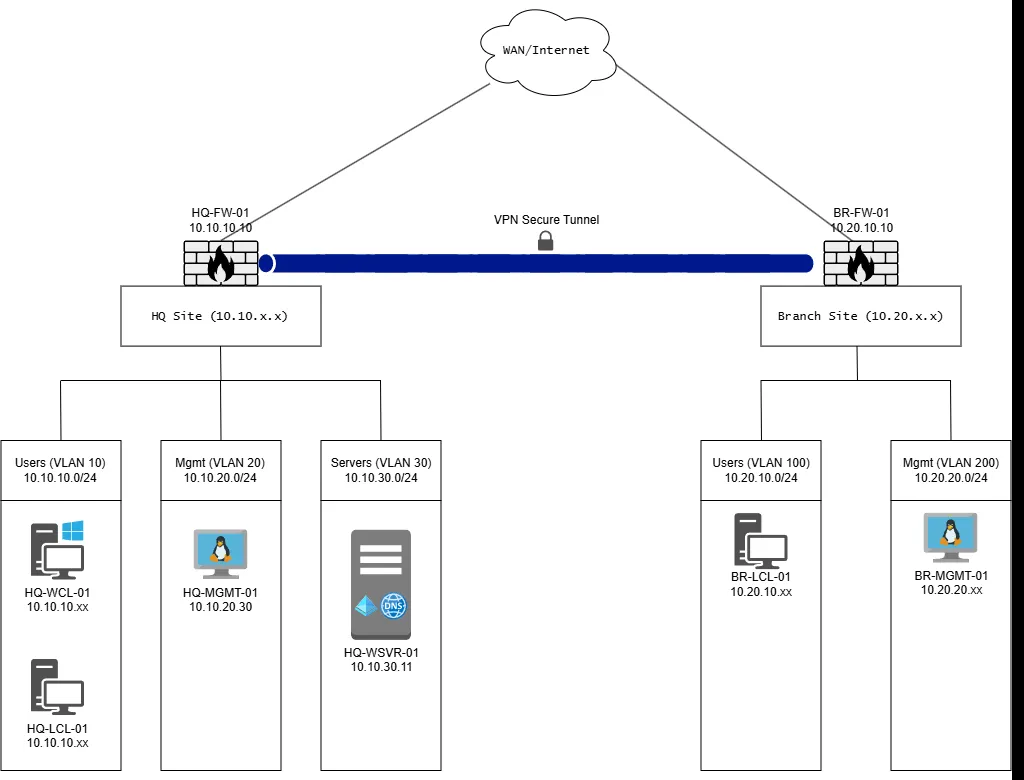 Figure 1. Two sites, five zones, one encrypted tunnel. The domain controller sits in the HQ server zone.
| Site | Zone | Subnet | Purpose |
|---|---|---|---|
| HQ | Users | 10.10.10.0/24 | Standard domain-joined clients |
| HQ | Management | 10.10.20.0/24 | Admin jump box and firewall management |
| HQ | Servers | 10.10.30.0/24 | Domain controller and DNS |
| Branch | Users | 10.20.10.0/24 | Branch domain-joined clients |
| Branch | Management | 10.20.20.0/24 | Branch admin jump box |
Clients: Windows 11 and Linux (Ubuntu 24.04, Debian 13, and Kali). Windows was chosen to validate Group Policy. Ubuntu and Debian test how Linux joins an Active Directory domain. Kali serves as a management jump box because its built-in network tools made testing much easier.
Scope
In scope: a two-site architecture; pfSense firewalls with routing and VPN; at least three segmented zones; a site-to-site VPN with controlled routing between sites; AD DS and DNS; domain-joined Windows and Linux clients with Group Policy; least-privilege rules within and between sites; and test evidence for every deliverable.
Out of scope: production deployment, high availability, cloud services, full endpoint management, and penetration testing beyond basic validation.
Scope change: A SIEM for centralized logging was in the original plan. The host machine didn’t have enough resources to run it alongside everything else, so it was moved out of scope, and the time went into finishing domain integration across both sites instead. (A SIEM became its own lab project.)
Implementation
Lab foundation
Each network component is its own virtual machine, and VMware virtual networks (VMnets) stand in for the physical segments. Two habits made the lab safe to experiment in:
- A snapshot before every major change, such as a firewall rule update or DNS change, so a mistake costs minutes instead of hours.
- Backups of the whole lab to a second SSD two to three times a week, so a corrupted VM can never set the project back more than a day or two.
Firewalls and segmentation
The HQ firewall has interfaces for WAN, Users, Management, Servers, and the IPsec tunnel. The branch firewall has WAN, Users, Management, and IPsec.
The rules were built on aliases: named groups of ports and networks such as AD_CORE_PORTS (DNS, Kerberos, LDAP, SMB, and RPC), WEB_PORTS, and INTERNAL_NETS. Aliases make the rule set readable (“Users may reach the domain controller on AD ports”) and keep both firewalls consistent.
Every rule was planned in a rule matrix before it was built. Each entry records the rule’s ID, interface, source, destination, ports, action, and a plain-English purpose.
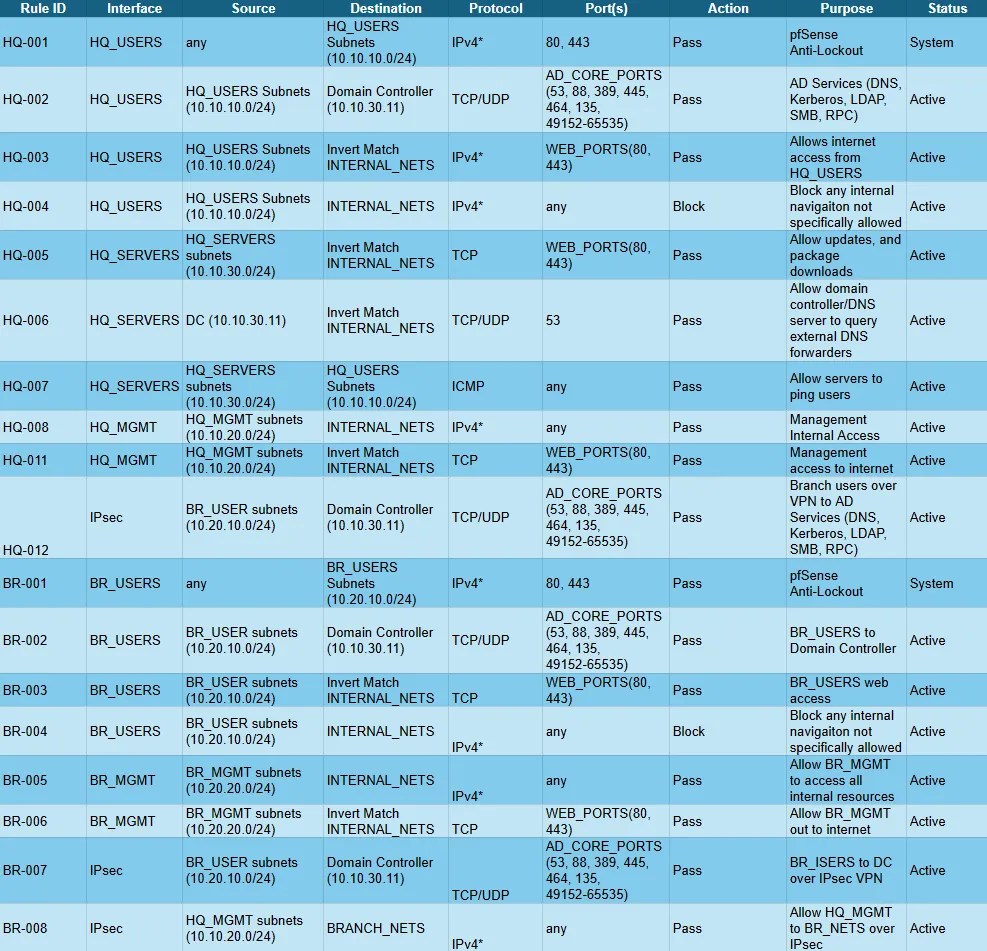 Figure 2. The firewall rule matrix. Users can reach the domain controller on AD ports and the internet on web ports, and anything else internal is explicitly blocked.
The pattern repeats in every zone: allow the specific services required, block all other internal traffic, then allow outbound web access. User zones can’t browse other internal networks. Only management zones have broad internal access, and those zones are tightly limited.
Identity and access
The domain controller provides AD DS and DNS for both sites. DNS forwarders let internal machines resolve internet names through the firewall, and a reverse lookup zone maps IP addresses back to hostnames, which makes troubleshooting and log reading much easier.
The organizational unit (OU) structure mirrors a simplified enterprise: sites, workstations, servers, management systems, and identities. Permissions are assigned to security groups by role, never to individual accounts.
Linux joined the domain too. Ubuntu and Debian clients were joined with realmd and sssd. On the management jump boxes, sign-in is limited to domain administrators and one tightly controlled group, GG_Linux_Sudo_Admins, and that group is also granted sudo on those machines. Privileged access to the most powerful part of the network is controlled centrally from Active Directory, not managed machine by machine.
Group Policy baselines
Group Policy Objects (GPOs) set security baselines for users and computers based on where they sit in the OU structure.
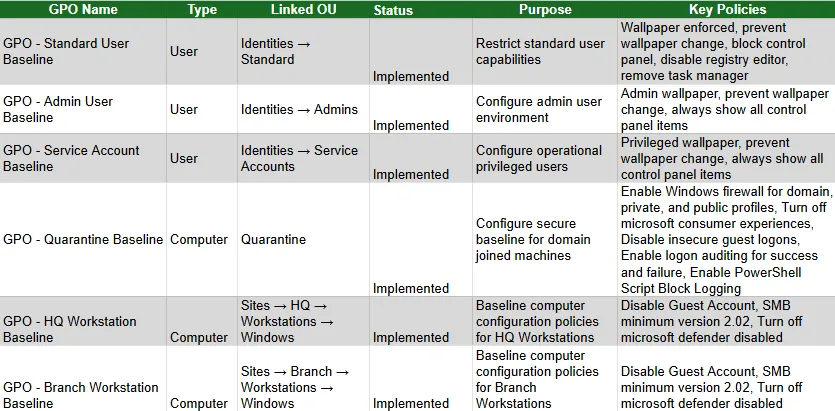 Figure 3. Group Policy baselines. User policies change with who signs in, and computer policies change with where the machine sits.
Highlights include restricting standard users (no Control Panel, registry editor, or Task Manager), a quarantine baseline for domain-joined machines (host firewall on for every profile, insecure guest logons disabled, sign-in auditing, and PowerShell script block logging), and workstation baselines that disable the guest account and require a minimum SMB version.
Site-to-site VPN
The two sites are connected with an IPsec tunnel between the pfSense firewalls, using IKEv2 with AES-256 encryption and SHA-256 integrity.
- Phase 1 defines how the firewalls authenticate each other and protect the key exchange.
- Phase 2 defines which subnets may use the tunnel, so only the intended traffic crosses it.
Because the lab is portable, its “public” addresses change every time it moves to a different network. A dynamic DNS service gives each firewall a stable name, so the tunnel reconnects wherever the lab runs.
 Figure 4. A Phase 2 security association installed between the Branch user zone and the HQ server zone.
Validation and testing
Every control was tested from the point of view of the user it was meant to restrict, and the results were saved as evidence. Testing covered VPN connectivity, DNS resolution across zones, domain sign-in from both sites, Group Policy application, and, most importantly, that blocked traffic actually stays blocked.
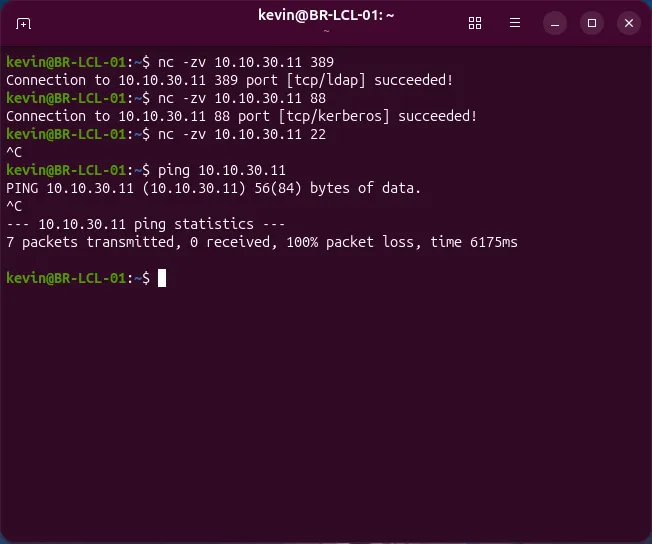 Figure 5. From a branch client, across the VPN, LDAP and Kerberos to the domain controller succeed, while SSH and ping are blocked. That is least privilege, observed rather than assumed.
Risks and how they were managed
| Risk | Mitigation |
|---|---|
| A corrupt VM or bad configuration change | Snapshots before major changes, plus regular backups to a second SSD |
| Limited host resources | Run only the VMs a given test needs |
| A firewall rule mistake breaks connectivity | Rule matrix review before changes; snapshot rollback |
| DNS errors break domain authentication | Validate name resolution at each step before moving on |
| The semester deadline | A work breakdown structure, with scope re-checked against time and hardware |
Results
The finished lab has two sites with pfSense firewalls, segmented zones with deny-by-default rules between them, a working site-to-site IPsec VPN, centralized identity and DNS, and Windows and Linux clients joined to the domain at both sites. It was delivered within the semester, and the only change from the original plan was the SIEM, which was moved out of scope.
Lessons learned
- Plan the rules on paper first. Working from a rule matrix kept two firewalls consistent and easy to review, and the matrix doubles as documentation.
- DNS is the foundation. Domain joins and authentication depend on it, so name resolution was checked at every step.
- Linux and Active Directory work well together once
realmdandsssdare understood, and controlling sudo through an AD group is a clean pattern. - Test the deny, not just the allow. A rule set only proves itself when blocked traffic is tested and seen to fail.
Future enhancements
- Centralized logging with a SIEM such as Wazuh, given more capable hardware.
- More granular rules, plus a dedicated server zone at the branch.
- More services, such as file sharing, endpoint management, and cloud integration.